Start Here: What Tools Fit Your Workflow?
Pick the option that fits you. Each one has a download and the first steps. The first three need Claude Code, Anthropic’s assistant that runs on your computer, with a Claude Pro, Max, Team or Enterprise plan or an API key. Only use a chatbot? Open the last one. Not sure? Pick Students.
Students
The full install: planning, citation checks, and a record of each work session.
Unzip it, open a terminal in the folder, and run:
bash install.shThen restart Claude Code and run /setup once.
No terminal? Open Claude Code in the unzipped folder and say: Read student/bootstrap.md and follow the installation instructions. It installs everything with its own tools.
Start with: /setup, /startup, /daily-summary, /help, /audit, /readable, /quick-ten, /list-maker, /step-by-step.
Researchers
The full install plus three extra reviewer roles for /coa, for papers and precedent.
Download for researchers (ZIP)
Unzip it, open a terminal in the folder, and run:
bash install.sh --addon-seatsThen restart Claude Code and run /setup once.
The three extra roles are Historian, Editor and Paper Reviewer.
Start with: /setup (once), /pcv, /coa, /pace, /audit, /acquire, /review, /meeting-breakdown, /bulletproof, /automate.
Instructors
Nine tools for planning, review and slides, without the session and citation commands.
Download for instructors (ZIP)
Unzip it, open a terminal in the folder, and run:
bash install.sh --minimalThen restart Claude Code and run /setup once.
It leaves out /startup, /daily-summary, /audit and the other session and citation commands. No Claude Code? /review and /quarto also work in a chatbot (see the last one). Classroom guides and a four-step start: instructor/README.md.
Start with: /setup (once), /pcv, /coa, /pace, /review, /quarto, /readable, /help.
Chat Only (No Claude Code)
Twelve tools as prompts for an ordinary chatbot, Claude or any other. Nothing to install.
Download the chat prompts (ZIP)
Three work fully and nine work with limits.
Unzip it and read README.txt first. Or open them one at a time in Use the Tools in a Chatbot, below.
Spec-Driven Development, in Practice
Spec-Driven Development treats planning, building and checking as three separate jobs, not one long conversation with a model. You write down what you intend before you build it. You build against that written intent. Then something other than the agent that built it checks the result against the intent.
This did not start as an SDD project. It started as a toolkit for PhD research, where one invented citation or misquoted number can sink a dissertation. The hard rules and verification commands came out of mistakes of that kind. The SDD name came later, when GitHub's SpecKit, Obra's Superpowers and the agents.md convention arrived at the same split.
/pcv shows the pattern in one command. It asks clarifying questions one at a time (Socratic questioning), writes the plan down, has a critic agent attack it, and waits for your approval before anything is built. The other commands use the same discipline.
The toolkit holds its own releases to the same standard. A script checks the command count and version on every page against the installer. Each check has been made to fail: a copy with a planted defect must turn its own test red. CI runs every check on Linux and macOS on each push.
AI as a Scaffold, Not a Replacement
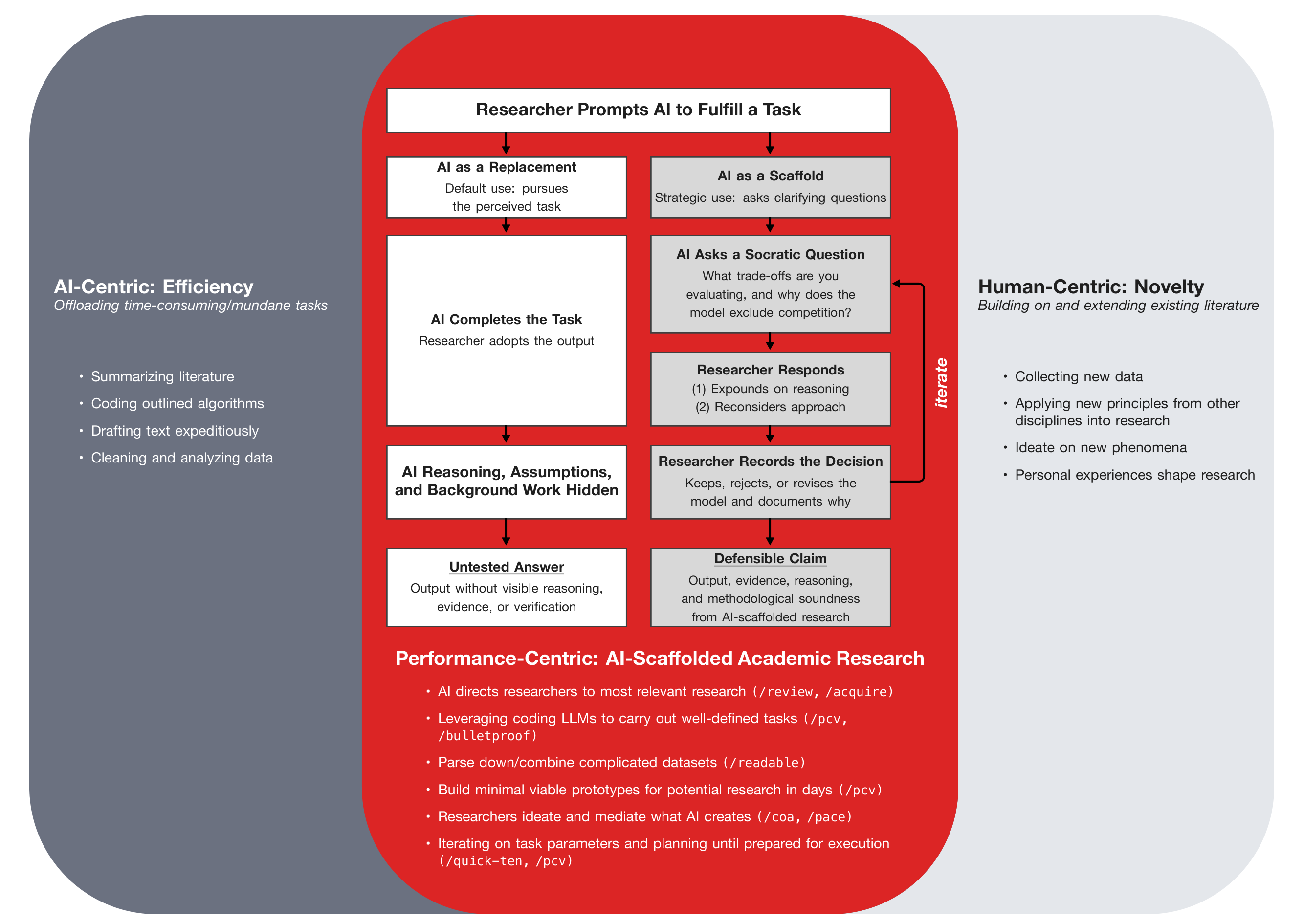
The toolkit is built for the scaffold path below: the AI asks before it answers, and the researcher keeps, revises or rejects each step and records why.
Research Amp Toolkit Description
A collection of 24 Claude Code commands that catch errors, prevent bad plans, and keep
complex projects on track. Organized into five layers: setup, verification, workflow, content, and triage.
Run /setup once and the commands use your folders and workstreams, not anyone else’s.
The commands are patterns to adapt. Fork the command files and change them to fit how you work.
Commands
Five layers, one table each: Setup · Verification · Workflow · Content · Triage.
Setup
| Command | What it does | |
|---|---|---|
/setup | Run once. Asks your project’s name, your name, the workstreams you track, where your summaries and run evidence go, and which Claude account you use, then writes ~/.claude/toolkit-config.md. Every other command reads it, so nothing assumes the author’s folders. Re-run it to change an answer. | Learn more → |
Verification Layer
| Command | What it does | |
|---|---|---|
/pcv |
Plan-Construct-Verify: structured planning with sequential clarification, adversarial review, and human approval gates before any code or document is written. PCV v3.14 by Dr. Michael G. Kay, NC State University. | Learn more → |
/quick-ten |
Before a build, asks only the questions whose answers would change it, ten at most (Socratic questioning). Then it recaps the answers and writes a short brief the build follows. Installed by the full install. | Learn more → |
/coa |
Council of Agents: starts several agents, each with its own professional view
(Skeptic, Economist, Practitioner and others). Each one analyzes the question alone, then a Chair reports
where they agree and where they differ. Five general seats are installed agent files
(~/.claude/agents/coa-*.md); three more (Historian, Editor, Paper Reviewer) come with
--addon-seats, and a seat for your own field is a persona file. On a smaller plan the default is a three-seat panel. |
Learn more → |
/pace |
Parallel Agent Consensus Engine: routes a task through two independent players with coaching review, then cross-compares for verification through redundancy. | Learn more → |
/audit |
Citation & numerical audit: verifies every cited metric exists on disk and every quoted number matches the source paper. Catches misquoted figures and fabricated citations before publication. | Learn more → |
/acquire |
Get the paper on file before you cite it: downloads a paper or a list of papers, refuses an HTML
page and a DOI that points at another paper, extracts the text, and grep-checks each claimed figure. Needs
pypdf or PyMuPDF (pip install pypdf PyMuPDF). |
Learn more → |
/bulletproof |
Tests that would actually notice: written before the code where possible, then proven by planting the defect each guard exists to prevent and watching the named checks go red. Installed by the full install. | Learn more → |
/guard-hook |
A hook guard that has been made to fail: scaffolds a guard, proves its self-test fails against a
neutered copy, registers it without an if: condition, or audits the hooks you have for six known traps. Useful only if you use
Claude Code hooks. Installed by the full install. |
Learn more → |
Workflow Layer
| Command | What it does | |
|---|---|---|
/startup | Reads your recent work summaries and tells you where you left off in each active workstream. | Learn more → |
/daily-summary | Creates a dated summary of the day’s work with cross-references to decisions and open TODOs. | Learn more → |
/weekly-summary | Aggregates daily summaries into weekly workstream reports; surfaces dormant threads and stale TODOs. | Learn more → |
/commit | Reads your staged changes and makes one commit per concern, so unrelated changes do not share a commit. | Learn more → |
/simplify | Reviews code or documents for redundancy, complexity, and performance issues via 5-lens analysis. | Learn more → |
/improve | Audits your own Claude Code setup and proposes improvements. | Learn more → |
/run-log | A table of your toolkit runs over time: outcome, tokens and convergence for each command, read from the run log the other commands write. It changes nothing it reads and adds one row of its own each run. | Learn more → |
/meeting-breakdown | Breaks a meeting transcript into a plan per domain, with the decisions, next steps and deferrals inside each one, from two independent framings and a review of each. Two agents on a smaller plan, five on a larger one. | Learn more → |
/list-maker | Turns a transcript, an email thread or notes into a numbered work list whose numbers never change, so “we’re on number 14” still means the same item next month. | Learn more → |
/step-by-step | One thing at a time, nothing skipped: walks what a session changed from a list built from git, and refuses to call the walkthrough done while an item is unexplained; or works a /list-maker list one item per turn. | Learn more → |
Content Layer
| Command | What it does | |
|---|---|---|
/quarto | Makes a Quarto RevealJS slide deck from your background documents. One command reads them, designs the deck and renders it, Mermaid diagrams included. | Learn more → |
/readable | Extracts the text of PDF, Word and HTML files into .txt files, in batches, with OCR for scanned pages, so citations can be checked with grep. | Learn more → |
/captioner | Adds a subject-identifying caption under every picture in a PowerPoint deck, and can write screen-reader alt text for images that lack it. A separate skill, installed from its own repository; not one of the 24 toolkit commands. | Learn more → |
Triage Layer
| Command | What it does | |
|---|---|---|
/review | Three-lens document review: Skeptic, Practitioner and Editor readers go through a document in parallel, then one summary gives the takeaways, what it means for your project, and three concrete implications. For documents others give you that you must understand quickly: advisor memos, papers, long emails, spec drafts. | Learn more → |
/help | Socratic triage: describe your situation in one line. /help asks at most one question, then recommends one to three commands. It does not run them; you do. | Learn more → |
/automate | Turns a task you just finished into a skill: the steps that are the same every time become a tested script, the judgment steps stay as instructions, and the new skill has to reproduce the original result. Uses /quick-ten. | Learn more → |
Use the Tools in a Chatbot
No Claude Code? Some tools also work in an ordinary chat. Open one, copy its prompt into a new chat, and give it your material when it asks. Each prompt starts with a short note that tells the chatbot what it cannot do in a chat, such as run commands or open your files, and never to claim it did.
Made for Claude, works in other chatbots. The tools were written and tested with Claude. You can paste them into ChatGPT, Gemini or Copilot, but nobody has measured the results there, so check the answers the way each prompt asks. If a chatbot asks which Claude account you use, say you are not using Claude Code.
A chat may refuse a long prompt. The /coa, /pace and /quarto prompts are the longest, about 54,000 to 65,000 characters; the others are under 20,000. If it does, open the prompt as text, save it, and attach the file.
Download all 12 chat prompts (ZIP) with a README that says what each one is for.
Works in a Chat
/help
Describe your situation in one line and it names the tool to use. It may name a tool that needs Claude Code; the toolkit page and the README in the ZIP list the tools that work in a chat.
Open it as text · The Claude Code file
Loading the prompt. If nothing appears, use “Open it as text” above./quick-ten
Describe what you are about to build. It asks the few questions whose answers change the build, then writes a short brief.
Open it as text · The Claude Code file
Loading the prompt. If nothing appears, use “Open it as text” above./simplify
Paste the code or the document. It reviews it for redundancy and complexity and proposes simpler versions; it cannot run your tests, so run them yourself before you keep a change.
Open it as text · The Claude Code file
Loading the prompt. If nothing appears, use “Open it as text” above.Works in a Chat, with Limits
Read each note. Where a tool uses several agents, one chatbot plays all of them, so their agreement proves little.
/audit
Paste the document and the text of each source. It checks each cited number against the text you pasted; a source you do not paste is reported as not on file, never as checked.
Open it as text · The Claude Code file
Loading the prompt. If nothing appears, use “Open it as text” above./bulletproof
Paste the code. It writes the tests and the planted defects; you run them and paste the results back, because it cannot run anything.
Open it as text · The Claude Code file
Loading the prompt. If nothing appears, use “Open it as text” above./coa
Useful for structured disagreement on a decision. One chatbot plays every council member and the Chair who sums them up, so the members are not independent and their agreement is weak evidence. It cannot read your files: paste the evidence each member should use.
Open it as text · The Claude Code file
Loading the prompt. If nothing appears, use “Open it as text” above./list-maker
Paste a transcript. It writes the numbered, tiered list. It cannot keep the ledger file, so save the list it gives you and paste it back next time to keep the numbers.
Open it as text · The Claude Code file
Loading the prompt. If nothing appears, use “Open it as text” above./meeting-breakdown
Paste the transcript. One chatbot plays the five agents in turn, so the review steps are not independent. It writes the per-domain plan in the chat rather than beside the transcript.
Open it as text · The Claude Code file
Loading the prompt. If nothing appears, use “Open it as text” above./pace
Gives you two framings of a task and a review of each. One chatbot writes both framings and both reviews, so their agreement proves little. Paste the task and any source it must check against.
Open it as text · The Claude Code file
Loading the prompt. If nothing appears, use “Open it as text” above./quarto
Paste your notes. It drafts the Quarto source for the deck; you render it yourself with Quarto installed.
Open it as text · The Claude Code file
Loading the prompt. If nothing appears, use “Open it as text” above./review
Paste the document. One chatbot reads it through all three lenses in turn, so the lenses are not independent readers.
Open it as text · The Claude Code file
Loading the prompt. If nothing appears, use “Open it as text” above./step-by-step
Paste the list of changes (for example the output of git log --oneline) or a numbered work list. It walks it one item per turn and tracks which items are left.
Open it as text · The Claude Code file
Loading the prompt. If nothing appears, use “Open it as text” above.Claude Code Only
| Tool | Why it needs Claude Code |
|---|---|
/acquire | It downloads and extracts files with a script. In a chat, attach the paper and use /audit with its text. |
/automate | It writes a Claude Code skill and script from your session's history. |
/commit | It reads and writes your git repository. |
/daily-summary | It builds the summary from your git history and the files the session changed. |
/guard-hook | It builds and tests Claude Code hooks. |
/improve | It audits the Claude Code setup on your machine. |
/pcv | PCV is a multi-file protocol that runs scripts in your project. Its method is described at https://mgkay.github.io/pcv/. |
/readable | It writes text files beside your PDFs for later searches. A chatbot reads an attached PDF directly. |
/run-log | It reads the run logs other commands write on disk. |
/setup | It writes the Claude Code config file the other commands read. |
/startup | It reads your project's summaries and git history on disk. |
/weekly-summary | It aggregates the daily summary files in your project. |
Which Model Each Agent Requests
This section is about Claude Code. A chatbot uses whichever model you picked there.
Nine tools start agents: /coa, /pace, /review, /daily-summary, /weekly-summary, /readable, /acquire, /meeting-breakdown, and /quick-ten when it convenes a council. Each one names the model it requests on the call itself, rather than inheriting your session’s model. The model comes from one table, chosen by the account you give /setup. A test fails the build if any command leaves its model unnamed. /pcv also starts agents, with the models its own files name; the same test checks those names against a recorded list.
| Agents | Smaller plans Pro, Team Standard, not sure | Larger plans Max, Team Premium, Enterprise, API, cloud provider |
|---|---|---|
Council seats (also in a /quick-ten council), cross-check and rebuttal; PACE players, coaches and reviewers; review lenses; /meeting-breakdown players and coaches | Sonnet | Sonnet |
The /coa Chair, whose synthesis is the one you read | Sonnet | Opus, if /model lists it |
| The daily and weekly summary writers | Sonnet | Sonnet (never Haiku) |
The page transcriber of /readable and /acquire, for a scanned PDF | Haiku, two readers that must agree on every number | Sonnet |
Smaller plans: Pro, a Team Standard seat, or “not sure”. Larger plans: Max 5x, Max 20x, a Team Premium seat, Enterprise, the API, or a cloud provider. Smaller plans also get a three-seat /coa council and a two-agent /meeting-breakdown by default; ask for the full run when you want it.
A cost policy, not a claim about your account. Anthropic’s guidance is to use Sonnet for teammates (Claude Code costs), and says Opus “costs several times more per turn than Sonnet” (Models, usage, and limits in Claude Code). So only the Chair moves to Opus, and only on accounts with a larger allowance. Haiku reads scanned pages on smaller plans, where a script refuses the transcription unless two readers agree on every number. No other toolkit agent requests Haiku. The bundled /pcv sets its own agent models: its critic requests Haiku, and its builder, research and verifier agents request Sonnet. Anthropic’s pages were read on 20 October 2026; the reasons and sources are in references/model-roles.md.
What the files cannot guarantee. They name the model each agent requests. An organization’s model allowlist, CLAUDE_CODE_SUBAGENT_MODEL_FORCE, an API key in your environment, or an alias that Anthropic moves can change what runs. Run /tasks to see the model each agent ran on (Subagents), and /model to see what your account offers.
Evidence
Three kinds, kept apart so you can tell what you can check yourself from what you have to take on trust. The full write-up is EVIDENCE.md.
Reproducible: Rerun It Yourself
Every check ships with a script that plants a defect and proves the check catches it. The checks, what each one refuses, and how to rerun them are in EVIDENCE.md.
A mutation check plants one defect in a copy of the check and requires the check’s own self-test to turn red. A check that has never been watched failing has never been tested.
Measured: How Often the Author Used Each Command
From the author’s own usage logs, 2 April to 19 October 2026, counted by scripts/usage_counts.py: /daily-summary (logged as /dailysummary) 357, /coa 164, /pace 59, /improve 24, /quarto 11, /audit 9, /review 3. One author’s workflow: it shows the commands are used for real work, not how well they work for anyone else.
Observed: What the Commands Caught (Single Author, Not Benchmarks)
| Command | What it prevents | What it produces |
|---|---|---|
/audit |
A cited figure changed silently when moved between documents. The error reached a print-ready deliverable. Only a grep against the source, at the last step, caught it. | A line-by-line verification report with VERIFIED, MISMATCH, and NOT ON DISK verdicts for every cited value in the document. |
/pace |
A logical error in an analytical calculation passed single-agent review undetected. Independent parallel agents caught it before the result was reported. The correction was material. | A consolidated, cross-checked deliverable with an explicit convergence and divergence analysis showing exactly where agents agreed and where they didn’t. |
/coa |
A methodological choice appeared settled until a council perspective surfaced the one assumption that made it fragile. That assumption became the focus of subsequent validation work. | A synthesis of the separate perspectives: where they agree, where they differ, and a recommendation with the conditions that would reopen it. |
/pcv |
By design, not a recorded catch. It prevents building the wrong thing by requiring human approval of a plan before any construction begins. Scope ambiguity and unstated assumptions are resolved at the moment of lowest cost. | An approved, adversarially reviewed plan with verification criteria defined before any line is written or any file is changed. |
/startup |
By design, not a recorded catch. It prevents losing track of where a project stands when multiple workstreams are active across sessions. It rebuilds the state from your records, not from memory. | A ranked briefing from your own session records: what is done, what is blocked, and what to do next. |
Methodology note. All agents in /coa and /pace are Claude models,
and most roles use the same one. Agreement between them shows consistency within one model family,
not independent validation. A cross-check by a model from another provider (optional, through a
separate MCP integration) partly addresses this.
Installation
Prerequisite: Claude Code must be installed. The toolkit runs inside Claude Code, not separately.
-
Clone the toolkit (pinned to v2.2.0).
git clone https://github.com/jbenhart44/Research-Toolkit.git cd Research-Toolkit git checkout v2.2.0 -
Run the installer.
It installs all 24 commands and the fivebash install.sh # the full toolkit bash install.sh --hooks # also the four optional hooks (none is registered) bash install.sh --addon-seats # also three more /coa seats/coaseat agents. Upgrading? Re-run it from the new checkout; what changed is in the v2.2.0 release notes.--hookscopies four optional hooks (usage counter, token budget guard, summary folder guard, protect files) and registers none;python3 scripts/register_hooks.pyprints the settings entries for the ones you choose. -
Restart Claude Code, then run
/setup.
It asks about your project, folders, workstreams and which Claude account you use, and writes~/.claude/toolkit-config.md. Upgrading from an earlier version? Run it again: it asks the account question and writes the transcription model. -
Type
/pcvin any Claude Code session to verify it works, or/helpif you are not sure where to start.
Prefer a versioned archive for citation? Download v2.2.0 · All releases & notes
Cite This Toolkit
If you use or build on this toolkit, please cite:
BibTeX entry
@software{benhart2026researchamp,
  author  = {Benhart, Jake},
  title   = {Research Amp Toolkit: Verification-First Commands for AI-Assisted Research with Claude Code},
  year    = {2026},
  version = {2.2.0},
  url     = {https://github.com/jbenhart44/Research-Toolkit},
  note    = {Bundles PCV (Plan-Construct-Verify) by Michael G. Kay}
}
The toolkit bundles PCV v3.14, the Plan-Construct-Verify
methodology and /pcv skill created by Dr. Michael G. Kay (NC State),
as its planning foundation. To cite PCV on its own, see
CITATION.md.
Contact
Jake Benhart
NC State University — Operations Research
jebenhar@ncsu.edu ·
jbenhart44.github.io ·
github.com/jbenhart44